Notification Management Guide
Stay on top of every account change, reviewer update, and project opportunity by checking the TagOn notification panel regularly. Use this quick reference to know exactly how to react to each alert.
1. Opening the Notification Panel
- Click the bell icon in the upper-right corner next to your avatar.
- A dropdown lists the newest notifications first; the red badge shows how many are unread.
- Blue dots indicate unread items. Click Read all to clear them at once or use the X icon to dismiss individual notifications.

2. Common Notifications and Required Actions
| Notification message | Meaning & Immediate Action |
|---|---|
| Your account has been locked by the requestor… | Temporary lock due to quality or policy issues. Contact the Requestor/Admin the same day to resolve. |
| You have been accepted to join project… | You passed the test/were approved. Open Projects and claim tasks immediately before slots fill up. |
| Your submission has been rejected | Reviewer flagged your work. Read comments, fix issues, and resubmit as soon as possible. |
| Your submission has been accepted | Work approved; payment is on the way. |
| Project … is now in Review/Fixing stage | Project entered QA/fixing. Grab Fixing WIs quickly to earn additional income. |
| New guideline updated for project … | Instructions changed. Re-read the guideline before labeling anything else. |
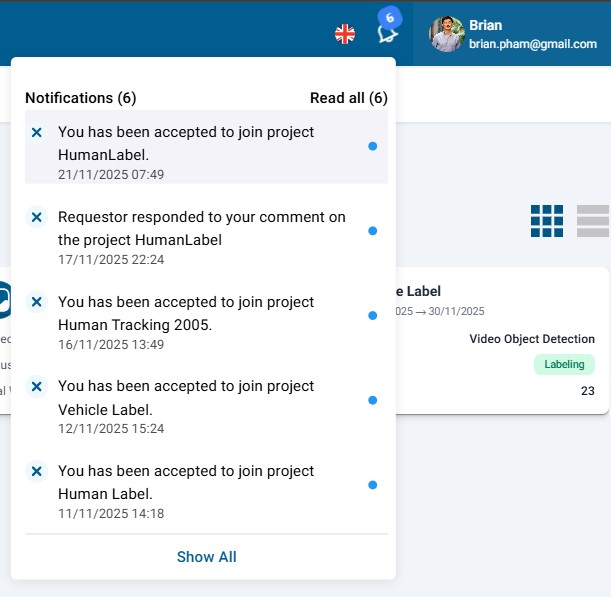
3. Fast Notification Workflow
- Click the bell to open the list.
- Prioritize items with blue dots or urgent wording (locked, rejected, guideline update).
- Open each notification and take the required action immediately.
- Clear the panel (Read all or X) when everything is handled.
4. Tips to Never Miss Critical Alerts
- Allow browser notifications when prompted so you receive desktop alerts even if the tab is closed.
- Check the bell at least three times daily: morning, midday, evening.
- Treat “account locked” notifications as top priority—resolve within 24 hours to avoid permanent suspension.
5. Five-Minute Action Checklist
| Situation | Immediate Response |
|---|---|
| Account locked | Message the Requestor/Admin right away |
| Accepted into a project | Open Projects and claim tasks immediately |
| Submission rejected | Read reviewer comments, fix the work, resubmit |
| New task / Fixing WIs posted | Claim the task before the slot disappears |
Make the bell icon part of your daily routine and you’ll never miss high-value tasks or surprise account actions.